

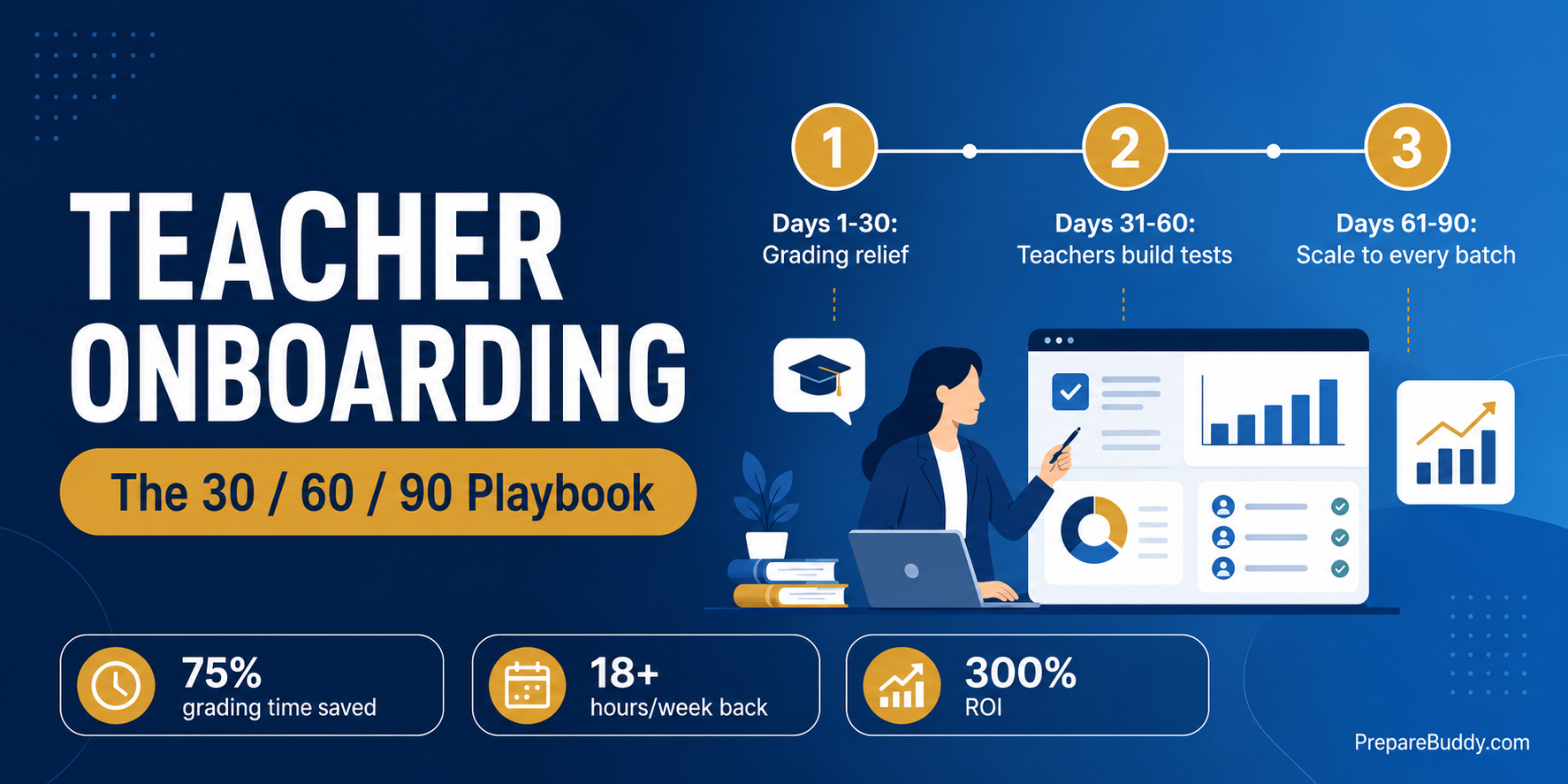
You signed the contract, the platform deployed in 48 hours, and the AI can score an IELTS essay in seconds. Three weeks later half your faculty are still marking writing scripts by hand on the same red-pen pile, and the dashboard you paid for is sitting at 20% usage. The technology was never the bottleneck. Teacher onboarding for AI test prep platforms is what decides whether your platform returns 300% ROI within 18 months or quietly becomes shelfware.
Across 200+ institutions and 50,000+ students prepared on PrepareBuddy, the pattern is consistent: coaching centers that reach full adoption in the first month don't have better teachers, they have a deliberate rollout plan. This is that plan — a 30/60/90-day change-management playbook for getting your IELTS, PTE, TOEFL and OET faculty to actually use the platform, without the pushback.
Why AI test prep rollouts stall at the teacher, not the tech
Deployment is the easy part — PrepareBuddy stands up a fully white-labeled platform in 24–48 hours. Adoption is the hard part, and it stalls for four predictable reasons, every one of which has a concrete answer inside the product rather than a motivational poster.
| Teacher objection | What it really means | The platform answer |
|---|---|---|
| "The AI will replace me." | Fear of redundancy | AI grades the first pass; the teacher review gate keeps the human as the final authority on every score. |
| "I don't trust a black-box band score in front of my student." | Fear of being wrong publicly | 95% AI scoring accuracy from multi-model verification, plus a 24-hour hold so teachers verify before students ever see a number. |
| "This is just more software to learn." | Fear of added workload | 75% of grading time and 18+ hours a week handed back — the tool removes work, it doesn't add it. |
| "My way already works." | Habit and ownership | The custom test builder lets teachers create branded tests in minutes, so the platform becomes theirs, not an imposition. |
What teacher resistance actually costs
Slow faculty adoption isn't a soft problem — it shows up directly in your margin. Every essay still graded by hand is teacher time you are paying for twice: once for the platform license and once for the manual labor it was meant to remove. Here is the gap between a center where teachers lean in and one where they hold out.
| Metric | Manual hold-out | Guided adoption on PrepareBuddy |
|---|---|---|
| Grading time per writing/speaking batch | Full manual load | Up to 75% reclaimed |
| Teacher hours returned weekly | 0 | 18+ hours |
| Score turnaround to student | Days | Seconds (with a 24-hour review window) |
| Test types one teacher can support | 1–2 specialisms | 11+ (IELTS, PTE, TOEFL, OET, CELPIP, Duolingo and more) |
| Platform ROI horizon | Never realised | 300% within 18 months |
The 30/60/90 teacher onboarding playbook
Don't roll the whole platform out to every teacher on day one. Sequence it so each phase removes a real pain before introducing new responsibility. This is the teacher onboarding for AI test prep platforms sequence we see work in coaching centers and language institutes.
Days 1–30: Win the skeptics with grading relief
Start where the pain is loudest: grading. Pick one or two senior teachers as champions, switch on AI assessment for a single batch, and let them watch writing and speaking scores come back in seconds against smart rubrics. Keep the teacher review gate on so the AI score is a draft and the teacher releases it. The message lands fast — this gives time back, and the human stays in charge. Assign roles correctly from day one: admins manage the org, examiners review and release results, members are students.
Days 31–60: Hand teachers the controls
Once champions trust the scoring, move from consuming to creating. Show teachers the self-service custom test builder: they pick a base style (IELTS, TOEFL, PTE, OET, CELPIP), choose a result format (raw points, CEFR level, or native band such as IELTS 6.5 or OET Grade B), and the AI generates a branded test in roughly two to five minutes — no IT ticket, no superadmin. Now expand the review gate to more cohorts and let teachers use inline annotations on a student's actual response, with threaded replies once results release.
Days 61–90: Scale and make it the default
By now adoption is self-sustaining. Roll the platform out across every batch, turn on the analytics dashboard so academic heads track cohort performance, and use per-student AI feature toggles to differentiate tiers — premium students get the AI tutor and AI exam generation, basic students get the core experience. Invitation-based bulk enrollment gets new intakes active in minutes, and the AI tutor absorbs after-hours doubts so teachers stop living in WhatsApp.
Keep teachers in control: the review gate
The single biggest adoption unlock is proving the AI does not overrule the teacher. PrepareBuddy's teacher review gate is an opt-in 24-hour hold on language test results, set per enrollment. When a student submits any test, the score is computed but held; the student sees an "awaiting teacher review" page with a live countdown, while every examiner gets an in-app and email notification with a deep link to the result.
From the review dashboard a teacher can save a private comment, add inline annotations on any part of the student's answer, or release the score immediately with a final note. If the institute goes quiet, results auto-publish at the 24-hour mark so no student is ever stuck — and every action is stamped with a full audit trail (who reviewed, when, released manually or automatically). Teachers keep authorship of the score; the AI just does the heavy lifting first. That is the difference between a tool teachers fight and one they defend.
Roll out AI gradually, not all at once
You don't have to flip every AI feature on for everyone. Per-student enrollment controls let you stage the rollout: enable AI assessment first, add the AI tutor for a premium cohort, then introduce AI exam generation once teachers are comfortable. Test visibility limits let you pace students through content instead of letting them burn the whole question pool in a weekend. Because the platform is fully white-labeled, none of this ever looks like an outside vendor — students and teachers experience it as your institute's own system, which removes a surprising amount of resistance on its own.
How to get started
If you are evaluating or already deploying a platform, treat teacher adoption as a project with an owner and a 90-day timeline, not an afterthought. Three concrete first moves: (1) name one or two teacher champions before launch; (2) start with grading relief on a single batch with the review gate enabled; (3) measure reclaimed hours in week one and share the number with the whole faculty. PrepareBuddy deploys white-label in 24–48 hours, the first month is free, there is no credit card required and no lock-in contract, so you can run a real pilot with one cohort before scaling.
See how the platform fits your faculty on the coaching institutes solution page, explore the full analytics dashboard, or review options built for language institutes.
Frequently asked questions
How long does it take to onboard teachers onto an AI test prep platform?
The platform itself deploys white-label in 24–48 hours. Faculty adoption is best run over 90 days: grading relief in the first month, test creation in the second, full rollout in the third. Centers that name champions and start with grading typically reach majority adoption inside the first 30 days.
Will AI grading replace our teachers?
No. AI produces the first-pass score with 95% accuracy from multi-model verification, but the teacher review gate keeps a human as the final authority — teachers can edit, annotate, comment and release every result. AI removes up to 75% of grading time so teachers spend it teaching, not marking.
How do we stop teachers from feeling overloaded by new software?
Lead with what the tool removes, not what it adds. Start onboarding on the grading workflow, where teachers immediately get 18+ hours a week back, before introducing test creation or analytics. Per-student AI controls let you stage features gradually instead of dumping everything at once.
Can teachers create their own tests, or only use pre-built ones?
Teachers and org admins can build fully branded custom tests through self-service — pick a base exam style and result format and the AI generates the test in about two to five minutes, with no superadmin or IT involvement.
Does this work for a multi-test coaching center?
Yes. One platform and one trained faculty can support 11+ test types including IELTS, PTE, TOEFL, OET, CELPIP and Duolingo, so you onboard teachers once rather than buying a separate tool per exam.
Ready to get your faculty onboard? Schedule a demo to see the teacher review gate and custom test builder in action, start your free first month with no credit card, or try a free test to experience the AI scoring your teachers will be releasing.


Join the Discussion