

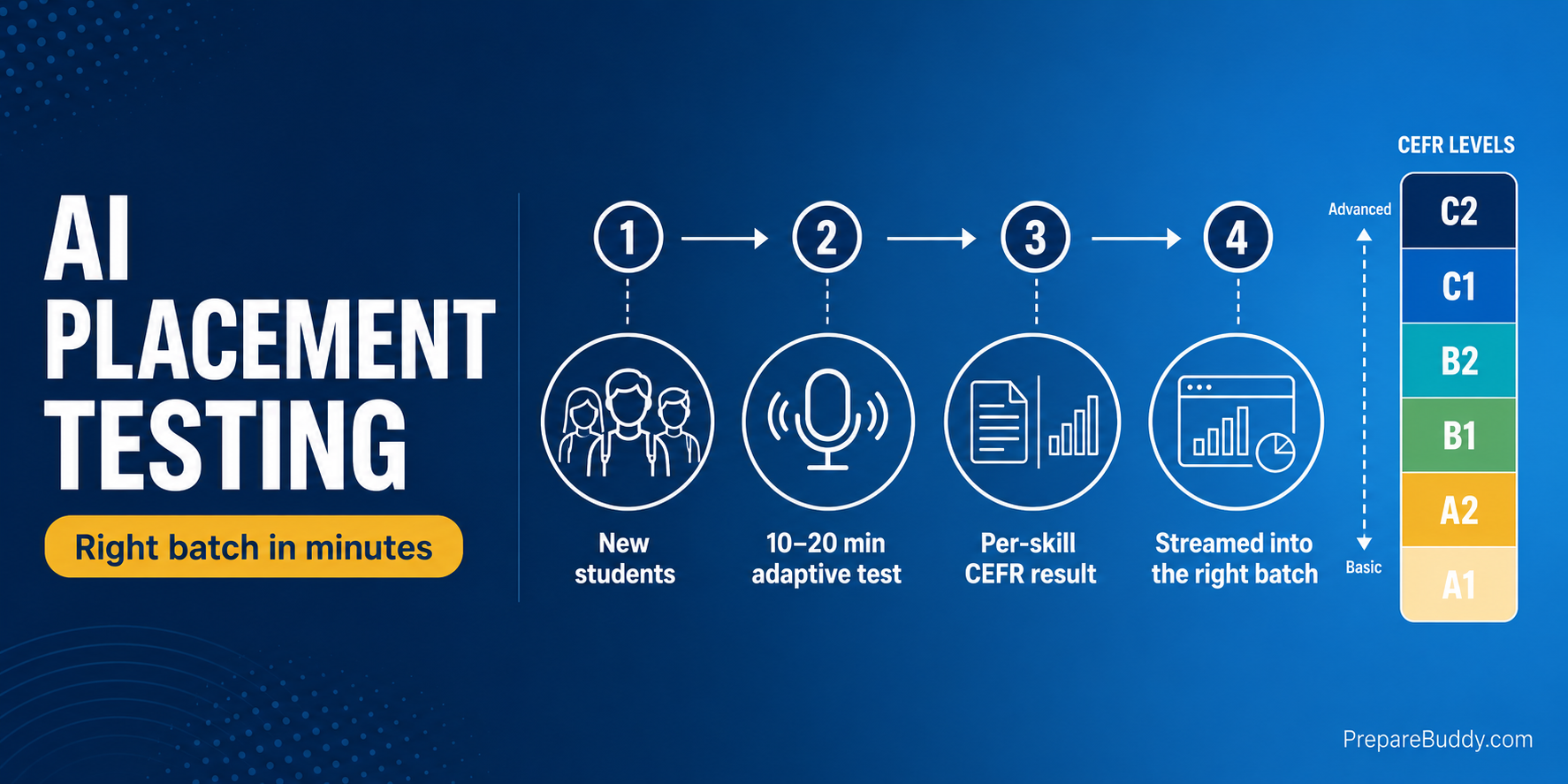
It's day one of a new IELTS batch. Twelve students share one classroom: two are already close to Band 7, three can barely hold a spoken sentence together, and the rest sit somewhere in between. The teacher spends the first two weeks discovering this the hard way — and by then the strong students are bored, the weak ones are drowning, and nobody is in the right class. AI placement testing for coaching centers solves this before the first lesson even begins, by measuring every new student's real level in under 20 minutes and streaming them into the batch where they will actually progress.
This playbook explains how AI-driven, CEFR-aligned placement works, why it beats the manual interview, and the exact five-step workflow coaching centers use to sort new IELTS, PTE, TOEFL and other language students into the right batch on PrepareBuddy.
Why manual placement breaks down at coaching centers
Most institutes still place students with a quick spoken interview, a paper grammar quiz, or — worst of all — whatever batch has an open seat. Each approach has the same three failure modes:
- It is slow and subjective. A 10-minute chat with a counselor measures confidence, not skill, and two counselors rarely grade the same student the same way.
- It is single-skill. A student can be a fluent speaker and a weak writer. Placing them on a single overall impression buries those gaps until mock-test week.
- It does not scale. When 40 students enroll in admissions season, no academic head has time to assess all four skills for each one by hand.
The business cost is real: mis-placed students churn faster, demand refunds, and leave the reviews that decide whether your next cohort fills. Getting placement right on day one is one of the highest-leverage things a test-prep center can fix.
What AI placement testing actually measures
PrepareBuddy's adaptive language proficiency engine generates a complete reading, listening, speaking and writing assessment and scores it on an internal 0–100 scale that maps directly to the international CEFR standard (A1 to C2). Crucially, it reports an overall CEFR level and a separate level for each of the four skills, so you see exactly where a student is strong and where they need work.
The same framework runs across 11 languages, and adaptive difficulty is calibrated per question — the test gets harder or easier as the student responds, which is what lets a reliable placement read happen in a quick 10–20 minute diagnostic rather than a full two-hour exam. Speaking and writing are graded by AI with 95% scoring accuracy through multi-model verification, so a fluent speaker and a hesitant one are separated objectively, not on a counselor's gut feel.
How scores map to CEFR levels
| CEFR Level | Score Range (0–100) | What it means |
|---|---|---|
| C2 | 85–100 | Mastery — understands virtually everything |
| C1 | 68–84 | Advanced — expresses ideas fluently and spontaneously |
| B2 | 51–67 | Upper Intermediate — interacts with fluency and spontaneity |
| B1 | 34–50 | Intermediate — handles most everyday situations |
| A2 | 17–33 | Elementary — communicates in simple, routine tasks |
| A1 | 0–16 | Beginner — uses familiar everyday expressions |
Manual placement vs AI placement testing
| Factor | Manual interview / paper quiz | AI placement testing |
|---|---|---|
| Time per student | 20–40 min of staff time | 10–20 min, student self-serves |
| Skills measured | Usually 1 (speaking or grammar) | All 4 — reading, listening, speaking, writing |
| Consistency | Varies by assessor | Same engine, same rubric for everyone |
| Output | A subjective “seems intermediate” | Overall + per-skill CEFR level (A1–C2) |
| Scales to 40+ enrollments | No — bottlenecks on staff | Yes — runs in parallel, unattended |
| Feeds a study plan | Manual, if at all | Auto-generates a personalized plan |
The 5-step AI placement workflow
Here is the exact process an academic head follows inside PrepareBuddy's coaching institute platform:
- Build the placement test once. In the Custom Test Builder, create a test with the result format set to CEFR Level at Intermediate (real-exam) difficulty — the recommended setting for placement. The AI generates the full reading, listening, speaking and writing test in roughly 2–5 minutes. You reuse this same test for every new intake.
- Invite the new cohort. Use invitation-based bulk enrollment to add incoming students by email. Set their visible-tests limit to “assigned-only” so they see exactly one thing on their dashboard: the placement test — no distractions, no browsing the wider library yet.
- Students take the test — anywhere. Each student completes the 10–20 minute diagnostic on their own device. Speaking is captured and scored by Voice AI; writing is graded against a rubric. No teacher needs to sit in.
- Read the per-skill CEFR result. Every student's result page shows an overall CEFR badge plus a breakdown by skill (for example, Reading C1, Listening B2, Speaking B2, Writing B1). A built-in calibration note keeps expectations honest about how the benchmark relates to the real exam.
- Stream into the right batch and open the library. Place each student by their result, then lift the assigned-only restriction so their full course, personalized study plan and practice tests unlock. From there, your analytics dashboard tracks whether they are progressing or stalling.
Turning a CEFR result into a batch decision
| Placement result | Suggested batch | What this student needs first |
|---|---|---|
| A1–A2 | Foundation | Core grammar, vocabulary and basic listening before any exam strategy |
| B1 | Intermediate | Skill-building across all four areas; introduce exam format gradually |
| B2 | Exam-focused | Targeted band-7 strategy, timed practice, and feedback on weaker skills |
| C1–C2 | Advanced / fast-track | High-band polishing, error elimination, and full mock tests |
Because the result is per-skill, you can also assign the same student to a targeted clinic — for instance, a B2 student with a B1 writing score joins the writing intensive while staying in the exam-focused batch for everything else.
The business case for getting placement right
Placement is not an academic nicety — it is a retention and margin lever. When students are in the right batch from day one, three things happen:
- Teachers stop teaching to the wrong level. AI grading and scoring already save institutes up to 75% of grading time and 18+ hours of teacher time every week; automated placement extends that by removing manual assessment from admissions season entirely.
- Students see progress sooner, so they renew. A correctly-placed student hits early wins, trusts the program, and is far more likely to buy the next test package — the foundation of a 300% ROI within 18 months that institutes on the platform have reported.
- You can prove level gains. Re-running the same CEFR placement test mid-course gives parents and students objective before-and-after evidence — a powerful renewal and referral tool.
All of this runs under your own brand. PrepareBuddy is a fully white-label platform, so the placement test, results and dashboards carry your institute's name, logo and domain — students never see ours. New centers can be live in 24–48 hours.
How to get started
You can see the placement experience from the student's side in minutes:
- Try a free practice test to feel the adaptive, CEFR-scored flow firsthand.
- Start your institute account — the first month is free, with no credit card and no lock-in contract.
- Want it mapped to your batches and branding first? Talk to our team about a guided setup.
Frequently asked questions
How long does an AI placement test take?
A placement diagnostic typically runs 10–20 minutes because adaptive difficulty narrows in on the student's level quickly, rather than making them sit a full-length exam.
Does placement cover all four skills?
Yes. The engine assesses reading, listening, speaking and writing, and reports a separate CEFR level for each — so you can place a student accurately even when one skill lags the others.
Can we use our own branding for placement tests?
Yes. PrepareBuddy is white-label, so the placement test, result pages and dashboards appear entirely under your institute's brand, logo and domain.
Does placement work for tests other than IELTS?
Yes. The same framework supports CEFR placement and exam-scale results across IELTS, PTE, TOEFL, OET, CELPIP and more, plus 11 languages for general proficiency streaming.
Ready to stop guessing where new students belong? Schedule a demo and we'll show you how to run AI placement testing for your next intake — or start free today.


Join the Discussion