

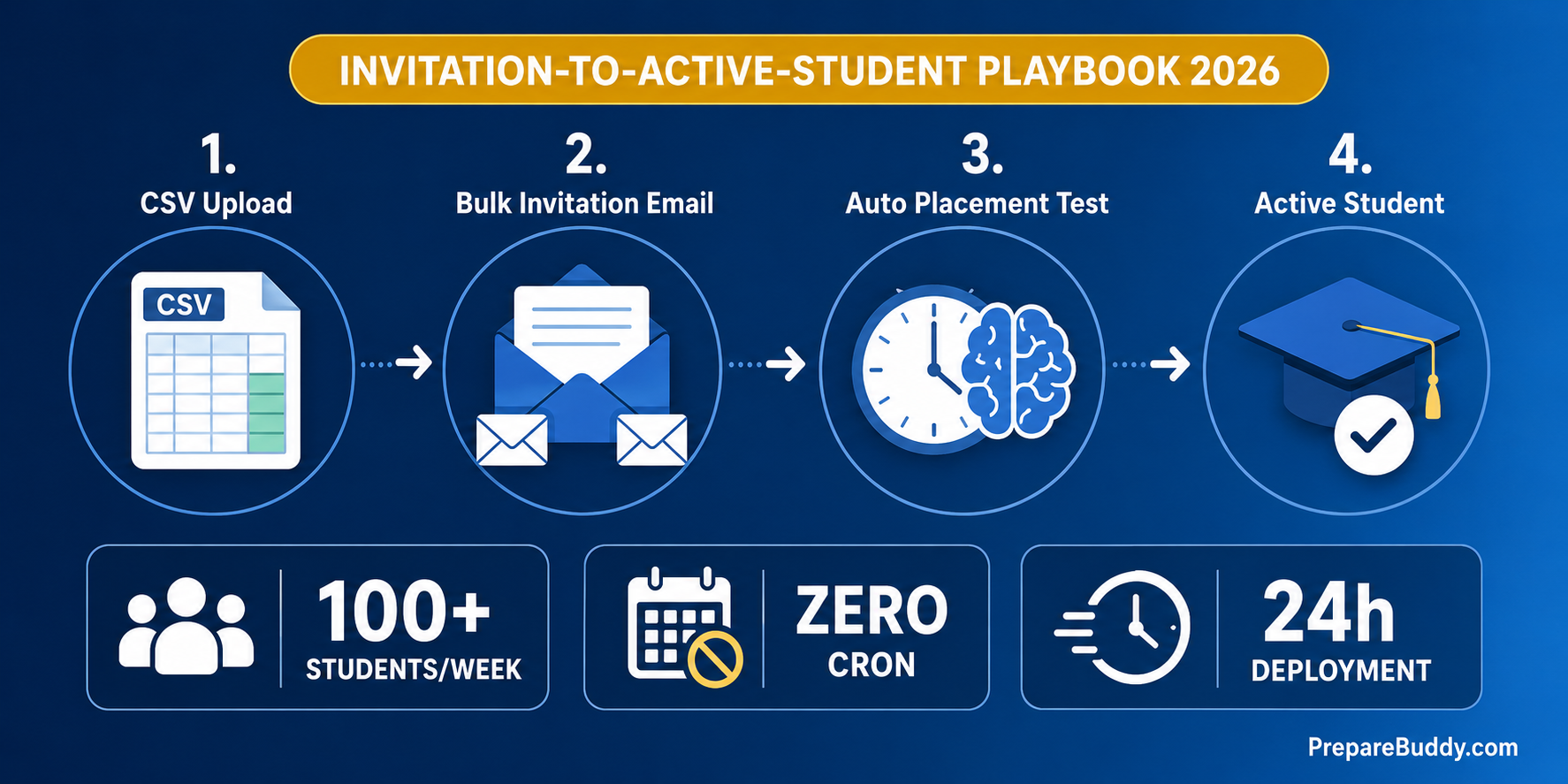
The receptionist at a mid-sized IELTS coaching center spends 42 minutes onboarding every new student: copy-paste the enrollment form into Excel, create a login in the LMS, send a WhatsApp welcome, add the parent's number, set the batch, switch on the AI features, schedule the placement test, generate the study plan, and email the receipt. Multiply that by 100 new students a week during peak admission season and the front desk is doing 70 hours of clerical work — work that should take less than 90 seconds per student. This is where most test prep coaching centers lose their teachers' time and their students' first impression.
This guide is the 2026 playbook for fixing that. It shows how coaching centers running IELTS, PTE, TOEFL, CELPIP, OET, GRE, GMAT, SAT, and Duolingo English Test prep are using PrepareBuddy's institute management features to onboard new students at scale — invitation-based enrollment, zero-cron lifecycle automation, per-student AI toggles, automatic placement tests, and multi-currency billing — all without hiring more admin staff.
The Real Cost of Manual Enrollment at a 1,000-Student Coaching Center
Before we talk automation, here's what manual student intake actually costs at a coaching center processing 100 new admissions a week:
| Manual Task | Time per Student | Per 100 Students/Week | Annual Cost (2 admin staff) |
|---|---|---|---|
| Account creation in LMS | 6 min | 10 hours | ~$15,600 |
| Batch & course assignment | 4 min | 6.7 hours | ~$10,400 |
| AI feature provisioning | 3 min | 5 hours | ~$7,800 |
| Placement test scheduling | 5 min | 8.3 hours | ~$13,000 |
| Welcome email + WhatsApp + parent contact | 8 min | 13.3 hours | ~$20,800 |
| Invoice generation & payment follow-up | 9 min | 15 hours | ~$23,400 |
| Manual lifecycle tracking (expiry, grace) | 7 min | 11.7 hours | ~$18,200 |
| Total | 42 min | 70 hours | ~$109,200 |
That's a full-time receptionist's annual salary spent on clerical work — before you've taught a single class. Worse, it's the first thing a paying student experiences from your brand.
What Student Enrollment Automation Actually Looks Like
Automation isn't a single feature — it's a sequence of decisions the platform makes on your behalf. Here's the 5-stage workflow PrepareBuddy uses, mapped to coaching center operations:
| Stage | What Happens | Manual Time Saved |
|---|---|---|
| 1. Invitation creation | Admin pastes email list (CSV or one-by-one), picks role, course, tenure days, AI features. Email goes out automatically. | 6 min/student |
| 2. Self-service onboarding | Student clicks link, creates password, account + enrollment auto-created with all AI toggles pre-set. | 4 min/student |
| 3. Automatic placement test | Custom Test Builder placement test (CEFR A1–C2 or native-scale band) assigned to student; max_visible_tests=0 shows ONLY the placement test, not the whole library. | 5 min/student |
| 4. Lifecycle & access automation | Zero-cron middleware moves enrollment from pending → active → grace → expired on its own. Warning email sent 7 days before expiry. | 7 min/student |
| 5. Billing & invoicing | Daily usage aggregated automatically. Invoice generated in your local currency with GST/VAT/Sales tax applied. Status tracked draft → sent → viewed → paid. | 9 min/student |
Result: 90 seconds of human input per student, the rest happens in the background.
1. Invitation-Based Bulk Enrollment (Replace Account Creation)
The traditional flow — collect form, create account, set password, email credentials — is broken. PrepareBuddy's invitation system inverts it: the student creates their own credentials and your enrollment record is created the moment they accept.
What an admin configures once per invitation batch:
- Email + role — student, examiner, or admin
- Course assignment — perpetual (individual tenure) or fixed (organization-wide cohort dates)
- Tenure days — default 365, customizable per invitation
- AI feature toggles — AI Buddy, AI Transcript, AI Exam Generation, Journey Enabled, Teacher Review Gate
- Domain bypass — invited users from any email domain can join even if your portal is restricted
The student clicks the unique tokenized link, sets their password, and a StudentEnrollment row is created with all AI features pre-provisioned. No copy-paste. No "I never got the credentials" emails. No mismatched batch assignments.
2. Per-Student AI Feature Controls (Stop Paying for AI Features Premium Students Don't Use)
Most coaching centers waste 20-30% of their AI budget by giving every student the same feature set. PrepareBuddy's per-student toggle model lets you tier access:
| AI Feature | Field | Use Case |
|---|---|---|
| AI Buddy | ai_buddy_enabled | Premium & long-tenure students — 24/7 doubt resolution |
| AI Transcript | ai_transcript_enabled | Speaking-heavy IELTS/PTE/OET students |
| AI Exam Generation | ai_exam_generation_enabled | Self-driven advanced batch students |
| Student Journey | journey_enabled (default On) | Study-abroad track students with consultancy bundle |
| Teacher Review Gate | requires_teacher_review | 24-hour hold on language test results — teacher verifies score before student sees it |
Trial students get a slimmed set. Paying batches get the premium stack. Pay-per-generation students get slot reservation. The decision happens at invitation creation, not after the student is enrolled.
3. Automatic Placement Tests at Enrollment
The "we'll do your placement test in class on Monday" workflow is the single biggest reason students disengage in week one. PrepareBuddy's Custom Test Builder lets you generate a branded placement test in three result formats:
- Points mode (e.g. 72/100) — corporate cohorts, ungraded practice
- CEFR Level mode (A1–C2) — generic placement (recommended for mixed-test batches)
- Native Scale mode — IELTS Band, PTE Score, OET Grade, TOEFL, or CLB band that matches the exam students are training for
Assigned at enrollment via the /language-tests/assignments/create/ flow with max_visible_tests=0 on the new student's enrollment, the placement test is the only thing the student sees on day one. Take it. Score lands. Study plan branches automatically. Teacher gets a notification with the student's actual starting level — not a guess.
4. Zero-Cron Lifecycle Automation (Stop Babysitting Expired Enrollments)
Cron jobs fail. Servers reboot. IT forgets. The standard outcome is a coaching center where 8% of "active" students are actually expired and still consuming AI credits.
PrepareBuddy's StudentLifecycleMiddleware sidesteps this entirely. There are no scheduled jobs. State transitions happen on the first request of each new day:
| Transition | Trigger | Student Access |
|---|---|---|
| pending → active | Start date arrives | Full access begins |
| active → grace_period | End date passes | Read-only (configurable window) |
| grace_period → expired | Grace cutoff reached | No access |
| expired → offboarded | Admin action or auto | Removed from billing |
Bonus: 7-day expiry-warning emails go out automatically. Your renewal funnel runs without your renewal team.
5. Multi-Currency Invoicing (10 Currencies, 4 Tax Types)
A coaching center with branches in Mumbai (INR + GST), London (GBP + VAT), Sydney (AUD + GST), Dubai (AED), and Singapore (SGD) historically needed three different finance tools. PrepareBuddy's billing engine supports 10 currencies (USD, EUR, GBP, INR, AUD, CAD, SGD, AED, JPY, CHF) and four tax types (GST, VAT, Sales Tax, Fixed) in one configuration per organization.
Daily usage aggregates automatically — active student-days, tests taken, evaluations run, storage. End of month, the invoice generates with line items, applies tax, sets the due date, and tracks status from draft → sent → viewed → paid → overdue. Your finance team reviews; they don't compile.
30-Day Rollout: From Manual Intake to Hands-Off Enrollment
| Week | What You Do | Outcome |
|---|---|---|
| 1 | White-label platform deployed in 24-48 hours. Set organization, currency, tax, branding, course types (perpetual / fixed). | Branded portal live at your-coaching-center.com |
| 2 | Build 1 Custom Test (placement) per test track. Configure invitation templates per batch type. | Placement tests ready; invitation flow tested with 5 students |
| 3 | Migrate existing students via CSV invitation batch. Set max_visible_tests=0 for placement-only mode. | All students self-onboard; placement tests start landing in dashboard |
| 4 | Run first billing cycle. Review daily usage rollup. Send first auto-generated invoices. | Finance team reviews instead of compiling; first hands-off renewal warnings sent |
What Coaching Centers Get Back
Centers using PrepareBuddy's institute management features report consistent operational lift:
- 18+ hours saved weekly on grading and admin overhead
- 75% reduction in admin time per student onboarded
- 300% ROI within 18 months from reclaimed teacher and admin hours
- 24-48 hour deployment of the white-label platform — no IT project
- 200+ institutions and 50,000+ students running on the same automation backbone
FAQ
Does invitation-based enrollment work for walk-in students who don't have email? Yes. An admin can create the enrollment directly from the institute dashboard, generate temporary credentials, and the same AI toggles and lifecycle automation apply. Email is the default path, not the only one.
Can we mix perpetual and fixed courses in the same organization? Yes. Perpetual courses give each student individual tenure dates (great for rolling admission). Fixed courses set organization-wide start/end dates (great for batches like "Spring 2026 IELTS Intensive"). Both course types coexist.
What happens if a student's enrollment lapses but they re-pay? Enrollment states include grace_period (configurable, default 7 days, read-only access) and expired. Both are reactivatable by admin without recreating the account or losing test history.
Does the Teacher Review Gate slow students down too much? A 24-hour ceiling is enforced — the auto-release middleware sweeps hourly, so no student is stuck waiting if a teacher misses the notification. Lazy "release on read" means students past the deadline see scores instantly. The gate adds quality control without creating support tickets.
How long does white-label deployment actually take? 24-48 hours for the branded portal, full domain setup, branded emails, and your organization configured. Custom Test creation and invitation campaign setup are then admin self-service — no engineering involvement.
Get Your Coaching Center Onto Automated Enrollment
If your front desk spends more than 5 minutes onboarding a new student, you're paying for clerical work that should be a background process. Schedule a demo to see the institute management workflow on your own student data, explore the coaching center platform, or try a free test to see how the placement workflow ends up on a student's dashboard.


Join the Discussion