

Walk into any coaching center on a Friday evening and you'll see the same scene: an academic head with three open tabs — a shared spreadsheet of student scores, a WhatsApp window with anxious parents, and a Word doc that's supposed to become a "weekly update." By 9 PM, six parents have been ghosted, two students have quietly stopped showing up, and the academic head still has 40 reports to write.
Parents who don't hear from you, leave. Industry retention data consistently shows that parents who receive proactive weekly updates from a coaching center are far more likely to renew, refer, and pay for premium add-ons than parents who only hear from the center when fees are due. Yet most coaching centers in 2026 are still writing parent reports by hand — or worse, not writing them at all.
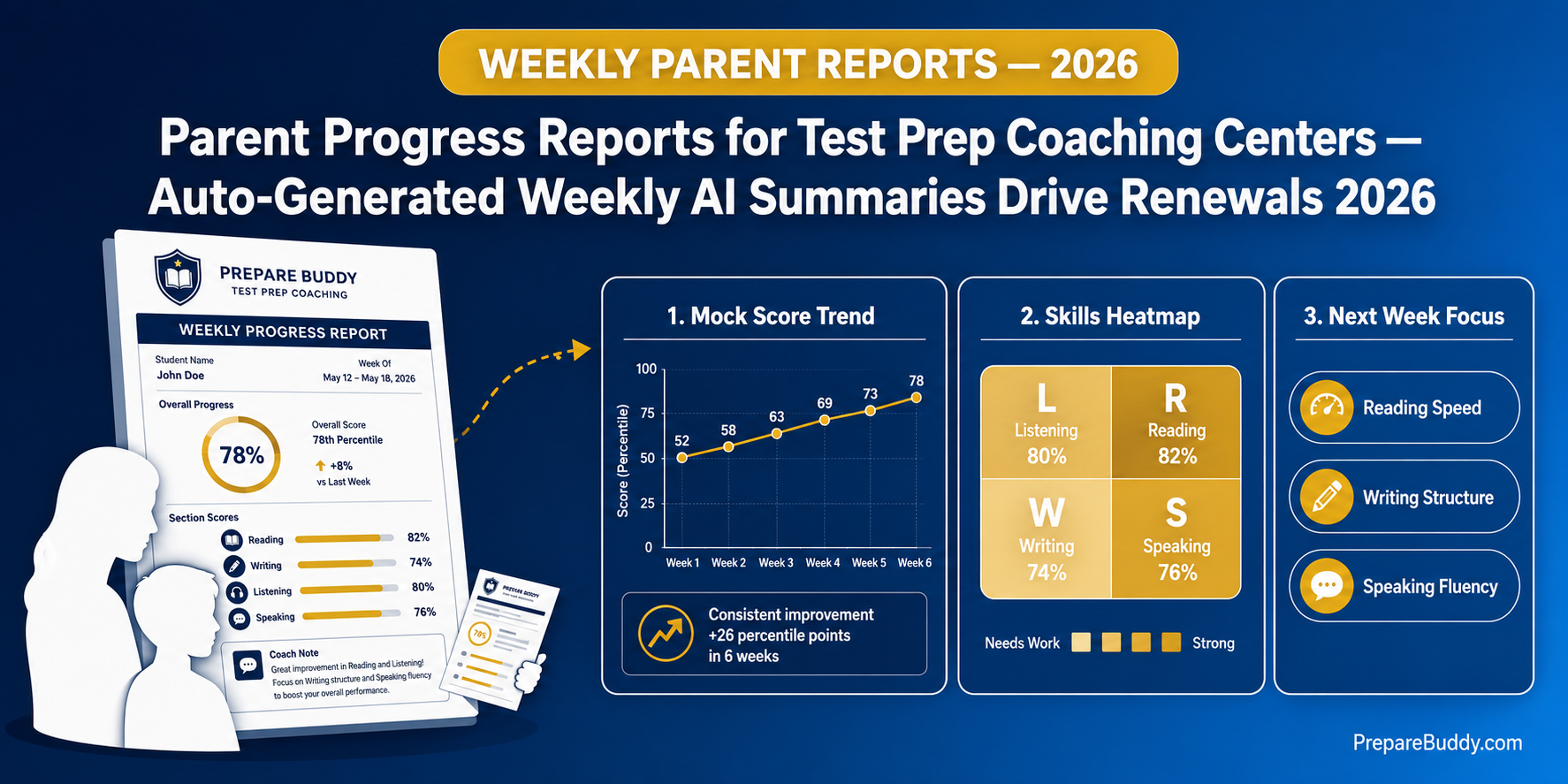
This is the parent reporting playbook for IELTS, PTE, TOEFL, CELPIP and Duolingo coaching centers that want to stop losing parents to silence — automating weekly progress reports, score trends, attendance summaries, and next-step recommendations from your existing student data, with the AI doing 90% of the writing.
Why Parent Reporting Is the Highest-Leverage Retention Lever Most Coaching Centers Ignore
Coaching center owners obsess over demo conversion, lead cost, and mock test results. Almost nobody tracks "parent satisfaction with communication" — even though it is the single biggest driver of mid-batch dropouts and end-of-batch renewal.
Here is the dynamic playing out in most centers right now:
| Parent Communication Pattern | Typical Renewal Rate | Typical Referral Rate | Common Outcome |
|---|---|---|---|
| No structured updates (ad-hoc WhatsApp only) | 22-30% | Less than 5% | Parents shop other centers mid-batch |
| Monthly informal summary by counselor | 35-45% | 8-12% | Renewal driven by score, not relationship |
| Weekly hand-written report | 55-65% | 15-20% | Academic head burns out, reports skipped Q4 |
| Weekly automated AI report with shareable dashboard link | 70-80%+ | 25-30%+ | Parents become a marketing channel |
The pattern is obvious: structured, predictable, data-rich updates outperform sporadic communication every time. The reason most coaching centers don't deliver them is also obvious — writing 200 personalized weekly emails by hand is impossible, and generic mail-merge updates feel insulting to parents who are paying a five-figure fee.
The fix is automation that still feels personal. That is what an AI-powered student dashboard with parent sharing is designed to do — and it is the core of how high-performing test prep institutes on the PrepareBuddy platform run their parent loop in 2026.
The Five Data Layers Every Parent Report Should Contain
A good weekly parent report is not "your child took 3 tests this week, the average was 64." That is a log file, not a report. It does not tell the parent whether their fee is working, whether their child is on track, or what to do next.
Strong reports answer four questions every parent silently asks every week: Is my child engaged? Are they improving? Where are they stuck? What happens next? The five data layers below cover all four.
| # | Data Layer | What Parents See | Why It Matters |
|---|---|---|---|
| 1 | Health Score (0-100) | One color-coded number summarizing engagement, score trend, and pacing | Parents who cannot read score reports can still read a green/amber/red ring |
| 2 | Activity & Engagement | Tests completed, day streak, longest streak, active days in last 30 | Catches the "child paid the fee but stopped logging in" failure mode early |
| 3 | Score Trend (90-day) | Per-skill scores over 90 days with trend arrows (Reading, Writing, Listening, Speaking) | Lets parents see whether the fee is producing measurable improvement, not a flat line |
| 4 | Recent Activity (7-day vs 30-day) | Side-by-side activity counts for assigned tests, self-practice, and mock tests | Distinguishes "took one big mock" from "consistent weekly practice" |
| 5 | Next Steps & Recommendations | A short ranked list of "what to focus on next week," generated from weak areas | Replaces vague "study more" advice with specific, measurable focus areas |
On PrepareBuddy, all five layers come straight out of the analytics dashboards the student already uses to study — there is no second data system to maintain. The parent view is a read-only window into the same numbers the academic head sees, packaged for a non-expert audience.
How Parent Sharing Actually Works (Without Creating a Privacy Nightmare)
The biggest concern academic heads raise about parent dashboards is data privacy. They are right to worry. Sending a parent the same login the student uses is a terrible idea — parents end up taking tests, deleting practice attempts, or accidentally locking the student out. Building a separate parent account for every student doubles the user base and triples the support load.
The cleaner pattern is a token-based shareable link: the student (or counselor on their behalf) generates a unique URL that opens a read-only summary. No login, no password, no risk of the parent breaking anything.
On PrepareBuddy, the implementation looks like this:
- Generate: Student or counselor clicks "Share with Parent" on the student dashboard. The system creates a cryptographically secure 64-character token.
- Expire: The link is valid for 30 days. After that, it stops working — parents who want continued access need a fresh link, which keeps stale URLs out of WhatsApp forwards forever.
- Revoke: Either the student or the institute can revoke the link in one click if the link is shared outside the family or the student switches centers.
- Read-only: Parents see the dashboard but cannot take tests, change settings, view answer keys, or contact other students.
The parent view itself shows the five data layers above, plus the study abroad journey stage if the student is on the Student Journey pipeline. Everything renders mobile-first because the overwhelming majority of parents open these links on a phone, not a laptop.
The Weekly Reporting Workflow That Replaces 14 Hours of Manual Work
Here is what a typical 200-student coaching center's parent reporting cycle looks like before and after switching to an AI-powered dashboard with parent sharing.
| Step | Manual Process | Automated Process | Time Saved |
|---|---|---|---|
| Pull scores for every student | Open 200 spreadsheet rows + cross-check against mock test results | Already aggregated in the student overview dashboard, live | ~4 hours/week |
| Calculate score trends | Eyeball numbers, hope they're moving in the right direction | 90-day per-skill trend lines auto-rendered with arrows | ~3 hours/week |
| Flag low-engagement students | Often skipped — only noticed when student stops paying | Health score drops below 60 triggers an at-risk flag automatically | ~2 hours/week |
| Write personalized commentary | Write 200 short notes by hand or copy-paste a generic block | AI generates a 3-line summary per student from their actual data | ~4 hours/week |
| Send to parents | WhatsApp broadcast or 200 individual emails | One shareable link per student, sent once, valid 30 days | ~1 hour/week |
The total is roughly 14 hours of academic head time per week for a 200-student center, which is the equivalent of nearly two working days that can go back into demo classes, teacher coaching, or just leaving the office on time.
PrepareBuddy customers report saving 18+ hours per week on grading and reporting across the academic team, with the platform handling 75% of the work the team used to do by hand. That figure is verified across the 200+ institutions and 50,000+ students currently using the platform.
What the AI Actually Writes (and What It Does Not Touch)
Parents do not want to read a 12-paragraph essay. They want a short, specific update that names a strength, a weakness, and a next step. PrepareBuddy's evaluation models — including the 120-billion-parameter generation model and the 17-billion-parameter scoring model — are calibrated to write exactly that kind of summary, drawing only from the student's own data.
A typical AI-generated weekly parent summary looks something like this in structure (the actual content adapts to the student):
- This week's strength: "Listening accuracy improved from 71% to 78% across 4 sessions — biggest gain in section 3 (academic lecture)."
- This week's gap: "Writing Task 2 score plateaued at Band 6.5; coherence band is dragging the overall score down."
- Recommended focus: "Two 40-minute essay sessions next week with the AI Tutor's coherence feedback enabled."
What the AI does not do: it does not invent scores, fabricate attendance, or make promises about target dates. It writes only from the verified score data the student has actually generated. Because the underlying evaluation hits 95% AI scoring accuracy with multi-model verification and 94% alignment with human graders via RAG, the academic head can sign these summaries without re-checking the math.
How to Roll This Out at Your Coaching Center in 30 Days
You do not need to rebuild your tech stack to start sending automated parent reports. The 30-day rollout most coaching centers run looks like this:
- Week 1 — Set up the platform. Deployment on PrepareBuddy takes 24-48 hours, with full white-label branding (your domain, your logo, your colors) so parents see your institute, not a third-party tool. The first month is free with no credit card required.
- Week 2 — Migrate the active batch. Pick one active IELTS/PTE/TOEFL batch (typically 30-60 students). Import their roster, assign them mock tests on the platform, and let them generate two weeks of practice data.
- Week 3 — Pilot parent links with 10 families. Pick 10 parents who are already engaged. Send them the shareable link. Collect feedback on what they did and did not understand. Most centers find parents ask for one or two extra fields (usually attendance and next mock date) — easy to add.
- Week 4 — Scale to the full batch. Send the shareable link to all 60 parents at once. Cadence: refresh the link monthly, send a WhatsApp nudge weekly with the latest health score. Track renewal conversations against parents who opened the link versus those who did not.
Centers that follow this rollout typically see measurable lift on their next renewal cycle. The unit economics are straightforward: even a 10-percentage-point improvement in renewal rate on a 200-student base at typical Indian-market batch fees pays for the platform many times over, which is consistent with the 300% ROI within 18 months PrepareBuddy customers report across their full deployment.
Common Pitfalls to Avoid
Three failure modes show up repeatedly when coaching centers first roll out parent reporting.
Sending the link once and forgetting it. Parents need a nudge to actually open the dashboard. A weekly WhatsApp message — "This week your child's score moved up 4 points, take a look" — drives 3-5x more opens than a one-time link share.
Reporting only on test scores. Score-only reports look bad in the first 3 weeks of a course before any improvement is visible. Lead with engagement metrics (streak, active days, sessions completed) and let the score trend build over time.
Letting the academic head become the bottleneck. If the workflow still depends on one person manually generating reports each week, you have not actually automated anything. The dashboard should be self-serve for the student, the counselor, and the parent — and PrepareBuddy's role-aware analytics are built so that every audience sees the right slice without anyone having to copy-paste.
The Bottom Line
Parent silence is the most expensive thing happening in your coaching center right now, and you cannot afford to keep writing reports by hand. A weekly AI-generated parent dashboard — built on real student data, shared via a secure 30-day link, signed off by the academic head in a fraction of the time — is the lowest-effort, highest-leverage retention move available to test prep institutes in 2026.
See how the parent reporting workflow looks inside PrepareBuddy. Schedule a 30-minute demo and we'll walk through a live dashboard with your batch size and student profile. Prefer to test the platform yourself first? Run a free diagnostic test to see the underlying scoring and analytics engine in action — the same engine that powers the parent reports your batch will receive.
For coaching center owners ready to go deeper on the operational side, our companion playbooks on demo class conversion, at-risk student detection, and renewal funnels close the loop on the full coaching-center revenue cycle.


Join the Discussion